What is BIM? Building Information Modelling explained
Everything about Building Information Modelling
BIM stands for Building Information Modelling. It’s a digital representation of the physical and functional characteristics of a building. Put simply, BIM is a system that captures and manages all information about a building throughout its entire lifecycle, from planning and design through construction and operation.
A key part of BIM is the 3D model. 3D BIM models hold detailed information about building components, including materials, quantities and (energy) performance data. BIM isn’t just useful during design and construction; it also supports facility management by providing accurate information about a building’s infrastructure, which helps with maintenance and operation.
An important difference from an ordinary drawing is that BIM doesn’t just have a geometric dimension. It also shows information about the properties of the various elements and components of the structure.
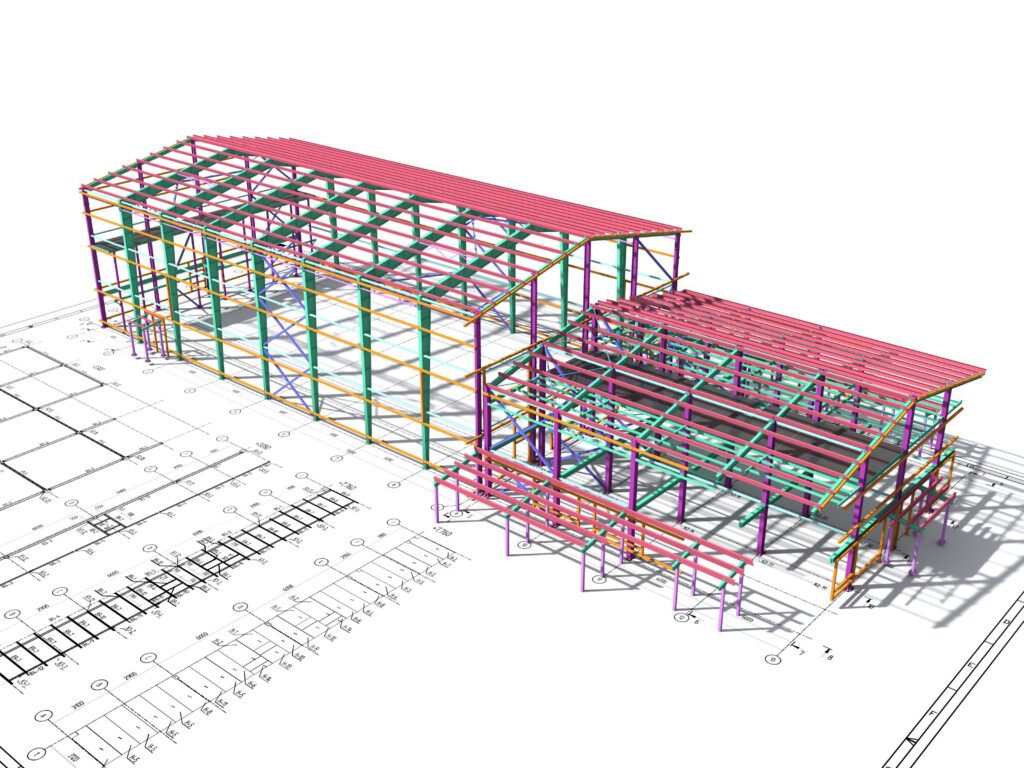
What is BIM?
BIM originally stands for Building Information Modelling. You’ll also sometimes see the term building information model used. Both mean the same thing, and already hint at what BIM is: a digital model that forms a virtual representation of a building, made up of objects with information attached to them.
Unlike a traditional drawing, a BIM model also shows technical properties and the relationships between objects. Take a wall: in the model, you don’t just record its position, but also the material (such as reinforced concrete), the cost and the colour. All that object-oriented information links back to the foundation, construction phases or structural strength. Every party involved adds their own expertise to this central model.
The difference between Building Information Modelling and Building Information Management
In practice, these two terms are often used interchangeably, but they highlight different sides of the process. The difference is action versus governance. Building Information Modelling is about the technical side: generating the digital representations. Building Information Management is about the overarching management of that data throughout the building’s lifecycle. It’s not about the modelling itself, but the organisation and strategy behind the data.
In a sense, construction is also information management.
Dick Lassche, coordinator at Van Wijnen
This shift is now being recognised in the standard itself. ISO 19650(the international standard for information management in construction) has been under revision since March 2026, and the new version reinforces exactly this distinction. Where the standard previously drew a hard line between the delivery phase (construction) and the operational phase (use), the upcoming version moves towards continuous information management across a building’s entire lifecycle, with no hard boundary between building and managing. BIM increasingly continues beyond handover and becomes an ongoing process of capturing, validating and passing on information, which is exactly what building information management is about. The first AI tools that automatically validate models against these information requirements are also emerging, making structured information management independent of the 3D model itself even more important.
What does BIM software do?
The main goal of BIM software is to create a complete, digital information package. By capturing every specification in one model, teams work more efficiently. That’s a core part of modern BIM construction management, and it leads to a significant drop in [failure costs](LINK TO CONFIRM – EN version) and smoother-running projects.
A safeguard for the future
Beyond giving you a complete overview during construction, a BIM model also has benefits down the line. All relevant information about a building stays available throughout its entire lifecycle, including if you renovate at a later stage. A bonus: you can also link the model to your long-term maintenance planning, so you always know what needs replacing when, and which jobs you can combine.
An advantage across the whole chain
In short, BIM makes life easier for every construction professional, and that benefit runs through every link in the chain. The architect can start designing directly in the BIM model, because all the dimensions the property developer set out are already there. Every party adds their own information to the model instead of starting from scratch. That makes the construction process faster, and therefore cheaper.
BIM viewer
You view the models in a BIM viewer, a tool that surfaces all the information with a few clicks. It lets you easily share and discuss models with your project team and external partners.
Many BIM viewers offer different options: view the architect’s or structural engineer’s model separately, or show them together. Dalux is widely used because of its low entry threshold; the Autodesk Forge 3D Viewer offers more freedom in file format (IFC or RVT) and advanced tools for checking objects against calculations. You can also take virtual walkthroughs and generate cross-sections for detailed analysis.
Open BIM vs. closed BIM
BIM can be set up in two ways: open BIM and closed BIM. The choice affects how construction partners collaborate and how much freedom they have in choosing software.
Closed BIM
With closed BIM, all construction partners use the same software, or a suite of programs from the same vendor. That gives a high degree of consistency and seamless integration, because all data stays within one platform in the same file format. The downside: partners are required to buy specific software, which can raise the barrier to collaboration.
Open BIM
Open BIM is based on open standards and universal file formats, so different software systems can communicate directly. Architects and contractors have maximum freedom in choosing their software, which improves accessibility and the long-term value of data. It does require clear agreements on information exchange and data management to avoid conversion errors.
IFC files and open BIM
Within open BIM, the Industry Foundation Classes (IFC) format plays a key role: the “universal language” of construction. It’s a neutral file format that isn’t tied to any one vendor, so partners can exchange models without losing information.
What makes IFC important?
- IFC is an open file format that isn’t tied to a specific software vendor.
- Data is readable by everyone involved, regardless of their own system.
- Using IFC lets construction partners exchange models without losing information, which significantly improves collaboration and efficiency on a project.
The advantages of BIM
Working with BIM adds value across every phase of a construction project. From the first design to long-term maintenance, managing information centrally turns construction from a fragmented process into a streamlined chain.
Drawings are always up to date
If an architect moves a window, the model immediately updates that change across every related view and schedule. That keeps your BIM model current without manual work, so you’re never stuck checking whether drawings are still accurate.
Lower failure costs
Thanks to the high density of information in a BIM model, design errors become visible before construction starts. This “clash detection” prevents costly on-site interventions. The result is a significant drop in failure costs, which protects both your margins and your reputation as a contractor.
Better collaboration
BIM breaks down the traditional silos. Architects, contractors and installers no longer work in isolation, but share their expertise early on. That builds mutual understanding and higher efficiency.
Getting stakeholders excited
For the client, a BIM model works as a powerful visualisation tool. Concrete 3D images make the design tangible, sparking enthusiasm and faster decision-making.
Time savings
BIM’s core strength is a single information source. Instead of scattered documents and multiple versions of drawings, every partner works from one shared model. That eliminates the hunt for the latest version and minimises miscommunication, saving huge amounts of time in coordination.
All information in one central place
Because everyone works in the same model, all relevant information about a project lives in one central place. Working with open standards like IFC also helps maintain a consistent level of quality across the entire chain.
Easier maintenance
BIM’s value doesn’t stop at handover. The model works as a digital library for the operational phase. Need maintenance or a repair later on? All the specifications on materials, colours and dimensions are available immediately. No more time-consuming site measurements or digging through paper archives.
Start at the beginning: get oriented on the possibilities. Which parts of BIM are relevant to you? Where do you sit in the process, and what’s your role relative to the links before and after you?
How do you get started with BIM?
Switching to BIM is an investment that pays for itself through a faster, more efficient construction process. To make the implementation succeed, work through four phases.
Step 1: Explore the possibilities
Take a critical look at your role in the construction chain and decide which BIM functionality you actually need. Choose BIM as part of your document management software, or opt for BIM-specific software. Do your homework: read whitepapers, watch demos and talk to suppliers to find out how BIM best supports your workflow.
Step 2: Find an implementation partner
You rarely implement BIM alone. Find a partner to guide the technical and process transition: an internal expert, an external BIM coordinator, or a specialised supplier. A good partner looks beyond the software and advises on integrating it into your existing operations.
Step 3: Build support within your organisation
Software is just a tool; people have to use it. Communicate clearly about the change: what’s the goal, what’s in it for the people using it, and how does their day-to-day work change? Enthusiasm on the floor is the biggest driver of lasting behavioural change.
Step 4: Implementation and your first project
Start with targeted training so everyone understands how the system works and their role in it. Begin with a small, manageable pilot project. Learning at a small scale and celebrating wins builds the confidence you need to roll BIM out across the whole organisation.
BIM in summary
At its core, Building Information Modelling is much more than a 3D design; it’s a methodology where information is the connecting factor. Managing all the relevant data about a building in one central place creates a digital twin of the physical project. BIM replaces fragmented silos with a streamlined chain, where digital preparation lays the groundwork for flawless physical execution.
Curious how BIM will keep developing in the years ahead? Read the future of BIM.
Ready to try BIM for yourself?
Discover how our software speeds up your construction process, improves collaboration and minimises failure costs. Our experts are happy to show you how BIM works for your organisation.
Frequently asked questions
What does BIM stand for?
BIM stands for Building Information Modelling: a digital representation of a building, where geometry (the 3D shape) is linked to data on materials, cost, lead times and maintenance.
What is the BIM method?
A way of working together where everyone involved (architects, contractors, installers) shares information in one central digital model, instead of exchanging separate drawings. Everyone works from the same source of truth, from design through to demolition.
What are BIM models?
The digital 3D files that visualise and analyse a building. Unlike an ordinary 3D drawing, these models are “intelligent”: a wall knows it’s made of concrete, what its insulation value is, and which pipework runs through it.
How is BIM used in construction?
The construction industry uses BIM to prepare the build process virtually. Clashes (say, a ventilation duct running through a support beam) get resolved on screen, before a single spade hits the ground on-site.
What does a BIM model do?
The model works as a central database: it collects, manages and shares information throughout a building’s entire lifecycle. You run simulations, calculate quantities, track the schedule and predict maintenance needs.
What does switching to BIM cost?
The cost of a BIM implementation involves more than just the software licence; factor in any hardware upgrades and, more importantly, the time it takes to train staff. You typically earn back that investment quickly through a substantial drop in failure costs and greater efficiency in project preparation.
How long does BIM implementation take?
If your company hasn’t started with BIM yet, getting everyone on board with the new way of working usually takes some time, on average around a year. The first three months are typically spent on orientation and basic training. In the following six months, most companies run a pilot project to test the new standards, before rolling the method out step by step.
Is BIM mandatory for every project?
Not yet for every project, but it’s increasingly becoming the standard requirement from professional clients and in public tenders. The growing complexity of construction projects and the push for sustainability are forcing a more data-driven approach. Companies that embrace BIM are building a head start.